
#37
May 28, 2007

Simple Search Form

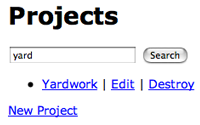
A search form is quite different than other forms, this is because it does not deal with model's attributes. See a good way to add a simple search form in this episode.
Tags: views forms
Download (18.4 MB, 6:28)
alternative download for iPod & Apple TV (9.6 MB, 6:28)
<!-- projects/index.rhtml -->
<% form_tag projects_path, :method => 'get' do %>
  <p>
    <%= text_field_tag :search, params[:search] %>
    <%= submit_tag "Search", :name => nil %>
  </p>
<% end %>
# projects_controller.rb
def index
  @projects = Project.search(params[:search])
end

# models/project.rb
def self.search(search)
  if search
    find(:all, :conditions => ['name LIKE ?', "%#{search}%"])
  else
    find(:all)
  end
end

RSS Feed for Episode Comments 52 comments

1. Zubin May 28, 2007 at 01:02

Thanks Ryan, another great episode, much appreciated!


2. weskycn May 28, 2007 at 01:12

good


3. Trueke May 28, 2007 at 01:37

Simple and powerfull. Nice tip. :)


4. creatop May 28, 2007 at 04:30

Nice, but what about more complicated non-model forms with many fields with validation required?


5. rachid May 28, 2007 at 05:14

thank u very much for your tips


6. Michael J. May 28, 2007 at 08:04

How about adding some ajax stuff such as a dynamicly generated drop-down box for the search field showing contents of a dictionary or project names based on the entered substring?

And PLEASE tell us something about deployment. A sample lighty or mongrel based setup would be nice. Thanks a lot for the excellent screencasts!


7. Rob May 28, 2007 at 09:22

What about showing how to search by booleans like 'AND', 'OR', etc.. or is that too complex to show in these casts?

Or what about doing an example that shows how exactly to get timezones setup and show some examples of using them? I found some good examples online but a screencast might be better.


8. Lisa May 28, 2007 at 10:21

You made a grave faux pas by not sanitising (html_escape, h) the search parameter when displaying it into the textbox after the seach; this is an avenue for XSS attacks.


9. Justin Ko May 28, 2007 at 10:41

I appreciate these episodes, very giving of you!


10. Emil May 28, 2007 at 11:26

@Lisa: Rails is doing that automatically.


11. Josh Peek May 28, 2007 at 16:31

Check out my simple search plugin that adds similar functionality to a model.

http://svn.joshpeek.com/projects/plugins/searchable/


12. Manuel May 29, 2007 at 07:01

Nice one! One idea: While coding I often think: Haven't you seen a clever hack for this in some recent railscast episode? So I find myself loading the movie again just to lookup some code snippet. What about adding the source snippets to the episode page, maybe folded to avoid clutter...?


13. pimpmaster May 29, 2007 at 07:53

Loving the simplicity of this screencast. I hope you do a part 2 where the user can select from a dropdown menu to filter results by different fields.

PS - I have to second Manuel's idea. Snippets would totally rock.


14. Ryan Bates May 29, 2007 at 08:20

I'll try to work on adding code snippets, notes, and links/resources to the episodes. Also thanks for the suggestions for future episodes everyone. :)


15. Michael D. Ivey May 29, 2007 at 12:05

I've been doing index() searches like this for a while now, and it never occurred to me to set the value of the text_field to the params, to make repeated searches nicer. Great idea, and it just went into my app. Thanks!


16. David Parker May 29, 2007 at 16:17

Yet another great screencast Ryan!

I just finished Peepcode's TDD screencast and I have to say, wow. Perhaps you can do some heavy duty TDD episodes in the future?


17. David Parker May 29, 2007 at 20:09

Okay, so I'm working through this screencast and I'm getting some errors... basically, everything looks okay and I can do a 'blank' search, but once I put something in it, I get the following:

undefined local variable or method `params' for Company:Class

#{RAILS_ROOT}/vendor/rails/activerecord/lib/active_record/base.rb:1233:in `method_missing'
#{RAILS_ROOT}/app/models/company.rb:13:in `search'
#{RAILS_ROOT}/app/controllers/companies_controller.rb:5:in `index'

All my code is in the same places (and looks the same) as yours does in the tutorial. Help?

Also, how would I go about writing tests for this if I was to do this (add this functionality) in a TDD way?


18. Ryan Bates May 29, 2007 at 21:18

@David, check your model. It looks like you are still referencing "params" in there. Notice I removed the "params" reference when moving it to the model.


19. David Parker May 30, 2007 at 04:38

Oh thanks! It was the last thing you deleted on the model... I must have blinked!


20. Matt P May 30, 2007 at 10:06

Thanks Ryan -- these screencasts are teaching me how to think in a rails way. Embarrassed to say that I have heard your voice in my mind when I'm coding my own project.


21. Oliver May 31, 2007 at 11:34

Thank you very much for this great podcast. And it made some things a lot easier, I already started to something like this /projects;search thingy and so on. But this one is much easier...


22. sthapit Jun 13, 2007 at 12:54

Awesome screencast, thanks again Ryan! 2 quick questions:

1. I like the idea of moving the search into the model but I'm using paginate like this:

@courses = Course.paginate(:all, :conditions => [...],
                                 :page => params[:page], :per_page => 10)

I can't figure out how to use paginate and also move the search into the model.

2. I want to be able to search by dates, but I couldn't find a date_select_tag so I ended up using form_for and form.date_select which makes the URL very messy in addition to messing up paginate. I was wondering how you would implement a search like the one you showed based on dates (maybe to show when your projects are due instead of just a keyword?).

Thanks!!


23. Ryan Bates Jun 13, 2007 at 13:50

@sthapit, good questions.

1. This is a problem I have with many pagination solutions out there. There's a few ways to solve it.

One way is to call the class method "search_conditions" and instead of having it do the find it will just return a conditions array so you could use it in the paginate method.

Course.paginate(:all, :conditions => Course.search_conditions(..))

Another is to call the method "paginated_search" and have it call "paginate" instead of "find".

Lastly you could have the search method accept a block which uses with_scope to set the find conditions. This way you could call "paginate" in that block and the conditions will automatically be applied.

If you need a more detailed explanation, I encourage you to make a post on railsforum.com and I'll try to reply there.

2. There is the select_date method which kind of works. However, IIRC, it still puts the date in a second hash so it won't be passed well in a GET request. You may need to make your own date selectors or just use a text field. Again, if you ask on the railsforum.com someone may have a better solution.


24. kjdash Aug 13, 2007 at 13:41

Ryan, great screencasts!

There is a typo in the code listing for this page. You are missing a single quote in

:conditions => [name LIKE ?'


25. Ryan Bates Aug 13, 2007 at 20:48

Thanks kjdash, it's fixed now.


26. Andres Nov 02, 2007 at 18:29

I dont know where do you place the projects_path, or what it is.

Great tutorial!


27. unrestfulinjapan Nov 16, 2007 at 09:20

This is awesome.... but it's not working for me. When you said use "restful routes" discussed in earlier railscasts, you meant map.resources, right? I added that, but now I get an error. I can show more if this isn't enough. And yes, "aoifna" is always what I use to test form inputs. Thanks for the railscasts. I use them often

Here's the error:

NameError in MoviesController#index

uninitialized constant MoviesController

RAILS_ROOT: script/../config/..

Request

Parameters: {"search"=>"aofina"}

Show session dump

---
flash: !map:ActionController::Flash::FlashHash {}

Response
Headers: {"cookie"=>[], "Cache-Control"=>"no-cache"}


28. unrestfulinjapan Nov 16, 2007 at 09:23

@Andres: I think that you have to edit the routes.rb file in the config folder so that it has:

map.resources :project

in it... but I'm not 100% on that, because I'm still getting an error.


29. Waild Dec 15, 2007 at 11:24

Hi Ryan,

Could you please explain what is projects_path?

It is not very clear for me.
Yours,


30. Some1 Dec 23, 2007 at 02:27

Ryan,

When you search about other word not in the list, it will show you blank page.

How I can avoid blank results?

Your advice please.


31. cover Dec 25, 2007 at 12:38

@Some1

You can do something like:

def index
  if params[:search]
    @projects = Project.find(:all, :conditions => ["name LIKE ?", "%#{params[:search]}%"])
    if @projects.size.zero?
      @projects = Project.find(:all)
    end
  else
    @projects = Project.find(:all)
  end
end


32. cover Dec 25, 2007 at 12:40

Or even better you can also show a notice, so will be:

def index
if params[:search]
@projects = Project.find(:all, :conditions => ["name LIKE ?", "%#{params[:search]}%"])
if @projects.size.zero?
flash[:notice] = "No result found"
@projects = Project.find(:all)
end
else
@projects = Project.find(:all)
end
end


33. David Poynter Jan 23, 2008 at 21:01

Hey Ryan, these railcasts are a great help to me. Is there any chance that you could do one with a search entry form that is not part of the index?


34. Ryan Bates Feb 29, 2008 at 11:07

@David, are you referring to some kind of separate "advanced search" page? With this you can create a custom REST action as shown here:
http://railscasts.com/episodes/35

I think it's acceptable to create a "search" action which behaves similar to index except it is dedicated to searching.


35. eddy Mar 07, 2008 at 09:50

hey buddy ... look am just trying to build a search form for the company i work for... now this is just the simplest of search forms i require.... just so that we can locate the site map and areas of this site... by typing the area code or name... i dont have any experience in this... do u know how i can download something like that or create it in a very basic format yet effictive... please get back to me as soon as possible.... i would appreciate ur help


36. Nate Mar 28, 2008 at 12:29

Thank you! I have been looking for this type of tutorial for, like, two weeks now! Bless you my son!
one quick question, though. Is there a way to combine this with pagination? I think I kind of know how that would work with scoping and what not, but I'm not sure.


37. Ernie Apr 08, 2008 at 10:24

Ryan,


38. Ernie Apr 08, 2008 at 10:29

Ryan,

 First, please delete the previous comment -- not sure what happened!

 Second, I've been enjoying Railscasts for a while. It's a great service you do here, and the site was instrumental in picking up the basics of Rails.

 You might be interested in a post I did that does a slightly more complex version of a model search, which I still call "simple model search." It's not as simple as the one you provided here, but it does actually let you largely duplicate your data entry forms, access a "Search" model instead of the normal model you'd call with form_for.

Anyway, it's at http://thebalance.metautonomo.us/2008/02/07/simple-model-search-with-rails/ if you're interested.


39. Jesse Apr 17, 2008 at 17:04

It took me awhile to figure out what projects_path is referring to. It's a variable that is created by adding the line "map.resources :projects" to the routes.rb file. Note that :projects refers to the model name, and that it flows through to the variable. So, if the model is called "visitors", the routes.rb file would you the symbol :visitors and the variable name would be visitors_path.

I hope this helps.

Thanks for the great screen cast. I found it really helpful.


40. Shikha May 01, 2008 at 21:08

How can we pass get parameters when user navigates to another pages using will_paginate?


41. Ernie May 02, 2008 at 09:41

Shikha,

    The example I provided in my comment above, http://thebalance.metautonomo.us/2008/02/07/simple-model-search-with-rails/ , shows the use of will_paginate. If you use get instead of post (as you should anyway, on an index action) you will end up with those search parameters as part of your URL.


42. kino May 23, 2008 at 01:55

The pure employment of our ideas is the mere result of the power of philosophy, a blind but indispensable function of the soul, as is evident upon close examination.


43. -aina- Jun 09, 2008 at 22:00

nice & easy for newbie like me :)
thanks :D


44. -scott Jun 27, 2008 at 16:11

Nice and thanks so much had one question. I changed the search field to search for a date entered in a format of 2008-06-27 and it will return my results.
Changing this input text field to a date_select I cannot make it work. I see the three params but I continue to get
You have a nil object when you didn't expect it!
You might have expected an instance of ActiveRecord::Base.
The error occurred while evaluating nil.[]

Will this inline type search work with date_select or select_date?
Thanks


45. Kung Jul 07, 2008 at 01:12

Many thanks for the casts.
i am a newbie and i have a problem with this if someone could help i'l appreciate it.
I am using this code and added a select to search for different stuff and i would like to have only 1 method to do that, but i get a mysql error. the code is:
view -->
<% form_tag ('find', :method => 'get') do %>
  
  <p>
    <%= text_field_tag :search, params[:search] %>
    <%= select :user, :type, User::USER_ATTRIBUTES %>
<%= submit_tag "Buscar", :name => nil %>
</p>
controller -->
if params[:search]
   
    @users =User.find(:all, :conditions => ["%#{params[:user][:type]}% LIKE ?", "%#{params[:search]}%"])

i get this:
Mysql::Error: You have an error in your SQL syntax; check the manual that corresponds to your MySQL server version for the right syntax to use near '%login% LIKE '%ro%')' at line 1: SELECT * FROM `users` WHERE (%login% LIKE '%ro%'

and parameters
{"user"=>{"type"=>"login"},
 "search"=>"ro"}


46. Juno Jul 10, 2008 at 11:03

Many thanks Ryan - you are the man! Excellent stuff. I'll be donating shortly!


47. K Sep 04, 2008 at 04:17

Awesome! I'm a little late to the ROR party, but your Railscasts help me to improve every day. Keep up the great work!


48. Jesse Sep 06, 2008 at 13:32

I'm with K. You save the day!


49. Nick Sep 26, 2008 at 08:55

Hey, great show. I'm very very new to RoR and still got it working!

However I'd like to make it so if no results are shown it shows a message, not display all. How is this possible in rails?

Thanks :)


50. John Oct 08, 2008 at 11:44

Nick - Just take out the else statement, then in your view check to see if @projects is holding anything, if its no then display a no results message...


52. Ruby Newbie Dec 12, 2008 at 08:50

Thanks!!!! Your screencast is good and easy.


53. Yue Li Dec 27, 2008 at 07:06

Very helpful! Thank you!

Add your comment:

(SKIP THIS ONE)

(required)

(not shown)


(use pastie or gist for code)

sponsored by:
if you want to help:
required:
Get Quicktime Player