
#102
Apr 21, 2008

Auto-Complete Association

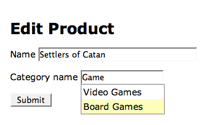
Usually a select menu is used for setting a belongs_to association, but in this episode I will show you how to use a text field with auto completion.
Tags: ajax forms
Download (20.3 MB, 13:29)
alternative download for iPod & Apple TV (15.6 MB, 13:29)

Update: As Stephen Gerstacker pointed out in the comments, the :param_name option is preferred over the :with option. See the code below for an example.

script/plugin install auto_complete
# product.rb
def category_name
  category.name if category
end

def category_name=(name)
  self.category = Category.find_or_create_by_name(name) unless name.blank?
end

# categories_controller.rb
def index
  @categories = Category.find(:all, :conditions => ['name LIKE ?', "%#{params[:search]}%"])
end
<!-- products/_form.html.erb -->
<p>
  <%= f.label :category_name %>
  <%= text_field_with_auto_complete :product, :category_name, { :size => 15 }, { :url => formatted_categories_path(:js), :method => :get, :param_name => 'search' } %>
</p>

<!-- categories/index.js.erb -->
<%= auto_complete_result @categories, :name %>

RSS Feed for Episode Comments 75 comments

1. Falk Apr 21, 2008 at 00:28

Thanks!


2. vesters Apr 21, 2008 at 02:50

Thanks very much - awesome!


3. jpemberthy Apr 21, 2008 at 06:25

Thaks! :P


4. Mourad Hammiche Apr 21, 2008 at 07:21

Hi

Your screencast make programming rails even more easy !

But there is something strange in the convention used for returning the matching categories.
"categories/index.js.erb" assume you returning javascript code ?
How does it works if I need to get real js elsewhere in my project ?

Thanks


5. Carlos JĂșnior Apr 21, 2008 at 07:44

Mourad Hammiche: instead of use formatted_categories_path(:js) you can use categories_path and at the :with clause you specify something like "partial=true" or "autocomplete=true", then you handle it in your controller to render a special HTML template for autocomplete. Imao it's better then use the js formatted being not semantic.


6. Ryan Bates Apr 21, 2008 at 08:14

@Mourad, great questions, I was wondering if someone would bring this up.

It would be really nice if the auto_complete plugin supported returning javascript (with rjs) instead of a simple HTML list, this way I could provide further instructions for modifying the functionality, however, AFAIK the plugin doesn't support this. Since the HTML list is so closely tied to javascript I find it acceptable to use the "js" extension.

As for your 2nd question, this is more difficult. You could pass a query parameter as Carlos mentioned. Alternatively you could create a new mime type, perhaps call it "autocomplete" and make an "index.autocomplete.erb" template. This should work, but I'm not sure if it's a best practice.


7. James Apr 21, 2008 at 08:15

Your best railscast to date! Thanks for digging into the details of auto-completing virtual attributes, it is just what I needed!


8. Lake Denman Apr 21, 2008 at 09:51

Nice, Ryan.
This was a good one.


9. mrb Apr 21, 2008 at 10:16

Hey Ryan! Thanks for the awesome screencast. One request -- when you show tips for associations which are simple has_many, it would be cool if you showed the same tip with how it would be changed with has_many :through -- this is a tripping point for a lot of beginners. Thanks!


10. Marcel Apr 21, 2008 at 12:47

Hi Ryan,

Just wanted to say thanks for this awesome screencast, and for all the others on your site. It's great to see an enthousiast like yourself sharing knowledge with the rest of the community.
You screencasts make my monday-mornings considerably more pleasant ;-).


11. Joe Beda Apr 21, 2008 at 14:30

Hey Ryan,

I love RailsCasts but I have two comments around this particular episode:

1) I think that using "js" for the request really is wacky. The content type of the response is "text/javascript" indicating that the content really *is* javascript. Perhaps this is a place to register a new psuedo mime type?

2) You are probably open to escaping bugs when you are passing the search parameter through. What happens with your sample app if you type "?foo=bar" into your category box. You need to url encode the value.

Change element.value to encodeURIComponent(element.value).

The prototype way would be to replace the entire :with value with:
Object.toQueryString({search: element.value})


12. Ryan Bates Apr 21, 2008 at 14:58

@Joe, good points. The more I think about it, a custom mime type would probably be a preferred solution here over using js. As mentioned above, ideally I would like to return javascript here with RJS, but AFAIK the plugin/scriptaculous doesn't support this. Someone please correct me if I'm wrong.

I hadn't thought about the escaping issue. I'll change the code in the show notes. Thanks!


13. James Apr 21, 2008 at 16:08

Hey Ryan,

This may be beyond the scope of this tutorial, but how do you handle setting virtual attributes that are scoped to another model? Let's say you want to have several categories that belong to a bucket, and want to find_or_create_by_name_AND_BUCKET_ID. You can't pass the bucket info to the virtual attribute in the model. This question is much more about virtual attributes than auto-complete, but I've had it come up a lot in other situations as well. Thanks!


14. Andrew Skegg Apr 21, 2008 at 16:08

This is just what I was looking for - thank you, thank you.


15. Geoffrey Grosenbach Apr 21, 2008 at 16:24

Great screencast, but it really exposed how hackish the autocomplete plugin is.

Why isn't it a regular form builder like the other form fields? Customizing it shouldn't be so awkward (i.e. passing raw Javascript). Why can't the controller method use the virtual attribute on the model?

To be honest, using unobtrusive Javascript seems more straightforward than jumping through Ruby to accomplish this.

There is a real opportunity for someone to refactor this plugin and become a hero!


16. Bryan Buchs Apr 21, 2008 at 19:24

[Long time listener, first time caller...] Ryan, I swear I saw you type "field.{tab}" to trigger a snippet of a formated label+field. Is that a stock TextMate function or something you wrote for yourself?


17. Ryan Bates Apr 21, 2008 at 20:30

@James, I'm not exactly sure if I understand your question. However, you could create a second virtual attribute for the bucket_id, save it to an instance variable, and use that in the category search.

@Geoffrey, I agree. I think they extracted this out into a plugin for a reason. I would love to see an updated version of it which flows better with modern techniques (such as REST).

@Bryan, it's a custom snippet I made. I use a lot of custom snippets and they are pretty easy to make. I recommend looking into it and developing your own library of snippets.


18. James Apr 22, 2008 at 07:51

Ryan,

Sorry I wasn't clear.

When you create a setter method, they can only have one parameter (the value of the virtual attribute). How do you include other values from your controller in these setter methods?

def category_name=(name)
  self.category = Category.find_or_create_by_name_and_parent_id(name, parent_id) unless name.blank?
end

Can't seem to figure out how to include additional variables (parent_id in this case) in these setters to keep them from being found if they 'belong_to' a different parent.

Same thing would occur if you were trying to tie a model object to "current_user".


19. Ryan Bates Apr 22, 2008 at 09:34

@James, the model will need access to the parent_id somehow, so I recommend creating a 2nd virtual attribute which sets an instance variable.

The problem is there's no way to guarantee the parent_id attribute will be set before the category_name. To solve this, you can use a callback to handle the category setting. Check out this code.

http://pastie.caboo.se/184873

You may want to email me if this doesn't solve your problem: ryan[at]railscasts[dot]com


20. Dan L Apr 22, 2008 at 11:58

Ryan, great railscast as always, but I have a question. When I enter "categories.js" into my browser to display the list of autocomplete items, I get "No route matches '/categories.js' with {:method=>:get}". I don't think I have my routes set up properly. Did you add any routes besides the default ones? I'm not well versed in routing yet, so I'm not sure what I need to add.


21. James Apr 22, 2008 at 12:17

@Dan - You'll probably want to add "format.js" to your respond_to block in your categories controller.


22. Dan L Apr 22, 2008 at 13:00

Thanks James; finally got it working! I had assumed I didn't need it since the file was index.js.erb instead of index.html.erb. Thanks for the help.


23. James Apr 22, 2008 at 13:59

Ryan,
Thanks for the help, adding an additional virtual attribute and doing the find_or_create in a callback worked perfectly.


24. Ryan Bates Apr 22, 2008 at 16:29

@Dan, Here's what my routes file looks like:

map.resources :products, :categories

This generates the formatted_catgories named route which should do what you want. I didn't need a respond_to block in my controller, but if you're not using Rails 2 you will need one.


25. Lucas Uyezu Apr 22, 2008 at 21:08

Thanks for the screencast, it's great and very useful.

When I was trying this, I found a problem with my controller: It wasn't generating anything in the "/controller.js" step. So I put the following code in the end of the method:

respond_to {|format| format.js}

When I tested it, I was given a 'Template is missing' screen, asking for an 'layouts/application.js.erb'.

So I realized my controller has a unremoved "layout 'application'" line in it.

After I removed it, it all worked.

I don't know what really happened, but it may generate some headache for people who'd really need the "layout 'application'" line.


26. Tim Apr 23, 2008 at 05:13

@Lucas - thanks for this 'semi' fix. I've been having problems with for the last day - no one else mentioned having problems so I thought my copy paste skills needed tuning...

I also have a layout :switch_layout (which is serves up a different layout depending on who's logged in) in my controller which is sending this Railscast off the tracks.

From what I've read of the above comments (Ryan, Joe and Geoffrey) - it would be cool to see a sudo mime type used and also a refactored auto_complete plugin...

Anyway, thanks for the screencast :D


27. Aerpe Apr 23, 2008 at 05:41

Hey,

I can't find any contact details so I'll try my luck here.

There's hardly any resources or tutorials on developing the navigation for an application with rails.

Any subject you plan on taking on?

Kind regards
Aerpe


28. Clemens Kofler Apr 23, 2008 at 07:16

I think the main problem is that scriptaculous' Ajax.Autocompleter by default sets the target element's innerHTML to the response of the AJAX call.

Maybe an idea would be to override Ajax.Autocompleter's default onSuccess behavior so that it parses a, say, JSON string and turns it into a list before assigning it to the innerHTML of the target element. This way, it would be reasonable to have a mime type of text/javascript or even application/json because JSON is returned.


29. Ryan Bates Apr 23, 2008 at 09:10

@Lucas, you shouldn't need to specify "layout :application" as this will be the default. However, if you do need to specify another layout you can do this:
http://pastie.caboo.se/185520

I would consider this to be a bug in Rails, maybe I'll get around to submitting a ticket or patch.

@Aerpe, thanks for the suggestion. I'll add it to my list. :)


30. Bala Paranj Apr 23, 2008 at 19:48

Great screencast! I had this problem in one of the project I am working one. Thanks.


31. Adam Apr 24, 2008 at 02:21

Thanks Ryan for yet another gem of a tutorial. keep up the great work.


32. Stephen Gerstacker Apr 24, 2008 at 08:40

This almost works, but it breaks support for tokens.

Instead of specifying :with, I use :param_name. This gives you the correct query string, it escapes the query automatically and tokens are supported.

<%= text_field_with_auto_complete :product, :category_name, { :size => 15 }, { :url => formatted_categories_path(:js), :method => :get, :param_name => 'search' } %>


33. Ryan Bates Apr 24, 2008 at 13:57

@Stephen, thanks! I had no idea there was a :param_name option. That is much nicer. I'll update the code in the show notes.


34. FJuan Apr 28, 2008 at 03:34

Thanks Ryan, you're doing a great job!

I've got a little question: is there an easy way to combine "comlex forms" and "autocomplete with association"?

What I'm trying to do is a "purchase order" form with differents "purchases" (like a porject with different tasks) and I'd like to autocomplete the name of the product of each purchase

Thanks again


35. Ryan Bates Apr 28, 2008 at 08:42

@FJuan, I haven't tried it, but you should be able to do this. The main thing you have to watch out for is that text_field_with_auto_complete can't be called through the form builder. This means you'll somehow have to get the name of the field to match what a normal text field would be. You may need to dig into the source code of text_field_with_auto_complete to figure out how to do this.


36. Joe Jammy Apr 30, 2008 at 11:48

Great work Ryan! I'm a rails beginner and this website has been a huge help.

@FJuan, I'm trying to do a similar thing using the autocomplete in conjunction with Ryan's complex forms. I'm going to look into the source code as Ryan suggested, and hope I dont mess things up. Thanks again Ryan!


37. Tim Cooper May 01, 2008 at 03:25

Thanks for this screencast - a really nice solution to drop down lists!

I'm having some troubles though... when I goto the url http://localhost:3000/categories.js nothing shows up... This is my dev.log

<pre>
Processing CategoriesController#index (for 127.0.0.1 at 2008-05-01 20:25:12) [GET]
  Session ID: BAh7BzoMY3NyZl9pZCIlZGU1MWNkNzQ2MTYzYTQ0MmY3ZDZmNDhhMjljYjU2%0ANjYiCmZsYXNoSUM6J0FjdGlvbkNvbnRyb2xsZXI6OkZsYXNoOjpGbGFzaEhh%0Ac2h7AAY6CkB1c2VkewA%3D--9533e6fe70bd20e0155ec58df1e28d241ac42676
  Parameters: {"format"=>"js", "action"=>"index", "controller"=>"categories"}
  Category Load (0.000386) SELECT * FROM `categories` WHERE (name LIKE '%%')
Completed in 0.00667 (149 reqs/sec) | Rendering: 0.00005 (0%) | DB: 0.00039 (5%) | 406 Not Acceptable [http://localhost/categories.js]
</pre>

Can anyone see something going on?


38. Kieran May 01, 2008 at 12:40

From your log: "[http://localhost/categories.js]"

It would seem Rails is trying to load from port 80 (default for apache), not port 3000 (default for rails).

Furthermore, I believe categories are stored in {RAILS_ROOT}/public/javascripts/categories.js, not {RAILS_ROOT}/public/category.js where is appears you are trying to find it.

Can you post some of your code?


39. Stephen Tudor May 02, 2008 at 12:44

This is great. Thanks Ryan for an excellent screencast, and congrats on breaking 100 episodes.

I'm a bit confused with how to get this process to work with a model that relies on virtual attributes.

For example, I have a Person with :first_name and :last_name attributes, and I use a virtual attribute :name as a shortcut to concatenate them and make it easier to search.

Unfortunately, find_by_name and its dynamic cousins don't exist because in this case, :name is a virtual attribute of Person.


40. Tim Cooper May 03, 2008 at 00:37

I was able to figure out what was happening before with the field not auto completing.. but now I'm having another problem.

When I hit the save button the category id isn't being stored in the product database.

the log says that category_name gets passed as a parameter but the relationship isn't saved - a new product is created with a NULL in category_id and a new category is created with a category_name.

Any ideas?


41. flaubert May 07, 2008 at 07:56

it possible to create more than only one attr_accessor ?? In my case, the "Category equivalent model", has 4 fields.


42. Lucas HĂșngaro May 16, 2008 at 13:13

I know it sounds a bit purist, but using virtual attributes this way you're tightening your model with the view, aren't you?

Besides that, how can I pass two or more parameters in the ajax request with the :param_name option? I got it working with the :with option, but that is a bit ugly.


43. Avishai May 23, 2008 at 09:30

Great screencast... I was trying to get this to work for days and this made it really easy.

I want to take it a step further though, and allow people to enter the name, but actually save the ID of the found object back into the database, which would be useful when adding existing items to a list. I've gotten the results back as JSON, but now I'm wondering how to actually take them and create the list from the JSON rather than an HTML ul.

Does anybody know?


44. rawdd May 25, 2008 at 10:57

auto-complete. oh yes, this good!
but if i have 100 users on-line, this very-very slowly


45. frank May 26, 2008 at 01:10

I tried the autocompletion exactly like the screencast and it works perfectly ....except for safari ( 3.1.1) in production mode. I get no requests at all when typing in the autocomplete field.

It does work in development mode and it works in production mode for firefox, IE6 en IE7.

Any ideas ...?


46. Luiz Carvalho Jun 10, 2008 at 05:01

Very Good!
tnks!


47. Jason FS Jun 20, 2008 at 08:01

Dear Rayn (and Tim Cooper).

Thanks for the work you put into this is helps a lot.

I am having the same problems as tim (i.e. the category id is not being saved into the product model).

any ideas what this might be?


48. jc Jun 29, 2008 at 18:30

This is a really good example, but it is now more easily accomplished with model_auto_completer:

http://agilewebdevelopment.com/plugins/model_auto_completer


49. Jeffrey Lee Jul 11, 2008 at 10:36

I'm attempting to use the auto-complete field to match related records that have a first_name and last_name field. In the profile model I've defined a full_name method that pairs the names: "#{self.first_name} #{self.last_name}"

I'm not sure if that is the proper way to accomplish what I need.

I've replaced all instances of name with full_name which is not working.

The virtual attributes in my other model are as follows:

def profile_name
profile.full_name if profile
end

def profile_name=(full_name)
self.profile=Profile.find_by_full_name(full_name) unless full_name.blank?
end

Now I know that the find_by_full_name is not correct,


50. Jeffrey Lee Jul 11, 2008 at 10:38

Sorry, submitted the form before I was finished.

but I cannot seem to figure out how to combine the fields for use with auto-complete. I don't care if I'm searching on "first_name OR last_name OR (first_name AND last_name)" or something similar but it would be nice to use the full name.


51. bijou Jul 24, 2008 at 01:20

hi Ryan! this was beautiful!
anwyay, i tried it on barebones projects and it worked! (only after i realized/overlooked a stupid mistake).

um, anyway, i was hoping i could incorporate it with your complex forms projects (episodes 73-75) and i tried and..... i can't get it to work. no matter how hard i squeezed my brain i can't seem to find the answer anywhere. i can't seem to make it cooperate with the "fields_for" method :(
the problem is that "text_field_with_auto_complete" doesn't seem to recognize for example, "auto_complete_field" of
<% fields_for "student[class_record_attributes][]" do |auto_complete_field| %>
when i use it like this:
<%= text_field_with_auto_complete :auto_complete_field, ...

any ideas? @_@


52. Peter Jul 25, 2008 at 12:19

@bijou
I'm also trying to incorporate auto-complete with a similar setup to the one introduced in Complex Forms 1-3.

Anyone have any tips?


53. bijou Jul 27, 2008 at 21:06

@Peter

i'm trying.... i tried to get it to work with text_field_tag, because in Ryan's example in this episode, it was used with the object-related text_field. i've put off using auto_complete for now. i need to finish other priorities for a project first before i go back to this... should i go back to this.


54. JDJ Jul 29, 2008 at 17:39

@ bijou and Peter

Just throwing in my chips to let you know I'm also trying to get text_field_with_auto_complete to work sensibly with fields_for.

However, unlike the Complex Forms 1-3 Railscasts, I'm not injecting fields_for with virtual attributes.

I'll post here if I can come up with a solution that isn't too embarrassing.


55. Eric Jul 30, 2008 at 12:10

Is there a way to modify what is displayed in the <li> that is produced? For instance, if I was autocompleting a Name field, searching by lastname only, so I'm doing something like this:

<%= auto_complete_result @user, :lastname %>

Is there a way to display both the firstname and lastname in the <li> that is produced?

I've tried having my format.js respond by calling a partial which contains both the firstname and lastname, and it displays properly when I trigger the autocomplelte, but then when I submit the form, both the firstname and lastname get injected into my :lastname field


56. Isaac Holmlund Aug 20, 2008 at 08:52

Is there a way to place many of these auto complete fields on one page? When I dynamically add more of these elements to my page (I need N topics with descriptions) the other auto complete fields don't work, I suspect because the div IDs are the same. Do you know of a way to fix this?


57. quatromil Aug 20, 2008 at 13:45

Hi, i followed the steps about the auto_complete and it works great!
but i need to add N more textfields with auto_complete in the same form (for example Complex Forms),
and i don't know how to do it, can you give me a hand with this? :(


58. Alex Aug 21, 2008 at 20:34

Hi,

i want to get the same effect with that auto_complete text field, but using class instead id, is that possible?


59. Mike Aug 22, 2008 at 03:37

Same Problem for me getting autocomplete to work with fields_for.

If anyone would get that to work I would appreciate a small hint on this thread :P

regards


60. Friseur Aug 30, 2008 at 01:52

Excellent. I've been searching for this for a long time. Thanks, Ryan!


61. Sri Sep 11, 2008 at 03:25

Hi Ryan ,
all goes fine, but the up/down arrow keys were not working in IE when selecting the items in dropdown

thanks


62. Urlaub Bayern Sep 16, 2008 at 21:10

thnak you Ryan for the fantastic resource.
Greets Urlaub Bayern


63. Richard Scott Sep 30, 2008 at 07:03

i am a rewbie,
i am having trouble getting this to work, i get a
"wrong number of arguments (0 for 1)"
is there anyway to download the example files for this video? thanks for the videos, I look foward to getting this to work :)


64. Event Locations Oct 10, 2008 at 14:04

Hi Ryan, your tutorial has just saved me a few hours of searching. Thanks a lot and best wishes from Germany!


65. Anderson Oct 15, 2008 at 09:18

Hi Ryan!
I tried to make your example work, but when i load the form, the text_field_with_auto_complete don't load the virtual attribute! Any ideas?!


66. Brian Oct 17, 2008 at 21:05

for some reason I'm getting the following routes-related error: formatted_piece_url failed to generate from {:controller=>"piece", :action=>"show", :id=>:js}, expected: {:controller=>"piece", :action=>"show"}, diff: {:id=>:js}
Any idea why it keeps wanting to use the show action? I can't seem to figure how to get the route to go to the index action. My code here is just formatted_piece_url(:js). Can't seem to get this working until the routes are working, but everything else from the video is working fine! Any help?


67. Erez Ben Shoham Oct 21, 2008 at 09:29

If you get the "wrong number of arguments (0 for 1)" Error?
Add * to
def category_name(*name)
and the error will disappear

Thank you Ryan! for your efforts

Erez


68. Erez Ben Shoham Oct 21, 2008 at 09:50

Or don't forget the =
def category_name=(name)


69. Mike Nov 19, 2008 at 14:10

how does this work if my model only has a unique ID column? the "name" is not unique.


70. fiesta online money Nov 20, 2008 at 17:41

Thanks Ryan,I think this is one of the most wonderful sites. I have great admiration for you.


71. aion online gold Nov 21, 2008 at 19:40

I have great admiration for you.


72. lily Nov 27, 2008 at 18:49

Thank you Ryan, your screencast is good. Please look at our URL, if necessary we can learn from each other.


73. evden eve nakliyat Dec 01, 2008 at 01:10

evden eve nakliyat


74. Pat Dec 01, 2008 at 20:20

Sorry if this discussion is very old by now... with regard to @bijou, @peter, @mike, etc.: I wrote a plugin recently that allows you to use text_field_with_auto_complete with fields_for so that it can be repeated multiple times in a single form.

See: http://github.com/pat11639/repeated_auto_complete

Hope this helps someone!


75. wow patch 3.0.4 Dec 03, 2008 at 18:43

good, thanks for your infos

Add your comment:

(SKIP THIS ONE)

(required)

(not shown)


(use pastie or gist for code)

sponsored by:
if you want to help:
required:
Get Quicktime Player