
#9
Mar 23, 2007

Filtering Sensitive Logs

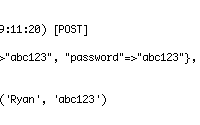
Are you accepting sensitive user data? Passwords, credit card numbers, etc. By default, Rails stores all submitted parameters in plain text in the logs. This episode will show you how to filter this sensitive input so it doesn't show up in the log file.
Tags: security
Download (8 MB, 2:42)
alternative download for iPod & Apple TV (4.6 MB, 2:42)
# controllers/application.rb
filter_parameter_logging "password"

RSS Feed for Episode Comments 8 comments

1. Heiko Webers Apr 23, 2007 at 01:11

Thanks, I put it on the Rails Security Project: http://www.rorsecurity.info/


2. gad May 12, 2007 at 14:43

good tip


3. chineseGuy May 12, 2007 at 21:43

filter_parameter_logging "password"
good tip


4. Rob Nov 13, 2007 at 06:59

Great stuff. Am interested to know what the prompt is for rails also [FILTERING] out the password confirmation field? Is this parameter key a regex?

It's suggested here that you need to have both :password and :password_confirmation in the filter_parameter_logging call -

http://wiki.rubyonrails.org/rails/pages/HowtoAuthenticate


5. tayfun Jan 16, 2008 at 06:45

I think rails filters confirmation field automatically if you filter the password field. So you don't need to explicitly say so.


6. kino May 23, 2008 at 01:53

Whence comes the manifold, the solution of which involves the relation between the Transcendental Deduction and our disjunctive judgements?


7. Aditya Sanghi Jun 08, 2008 at 14:03

Is there a way to get the exception_notifier plugin to use the filter_parameter_logging directive?

Anyone played with exception_notifier and parameter logging?


8. Faktura vat Jun 15, 2008 at 00:23

Very good cast and good solution. I am sure that many developers forget about data in logs.

Add your comment:

(SKIP THIS ONE)

(required)

(not shown)


(use pastie or gist for code)

sponsored by:
if you want to help:
required:
Get Quicktime Player